 New in
{{ pdp.img + 1 }}1 / 4
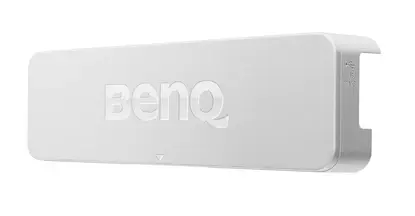
BenQ PT01 PointWrite Interactive Touch Module
In stock · Usually ships in 1–5 business days*
- Original manufacturer warranty
- Free delivery over AED 2,500
- Installation available
- Returns for manufacturer faults
The lowdown
The lowdown
Key features
- Converts any projection surface into a multi-touch interactive whiteboard
- Infrared sensing detects fingers, pens, or any objects
- Supports up to 4 simultaneous touch inputs
- 1-second auto-calibration for instant setup
- Windows 8 touch interface compatible
- Dual-screen projection for multitasking and annotation
- Simple USB cable connection to host computer
The BenQ PT01 PointWrite Interactive Touch Module upgrades any compatible BenQ projector into a fully interactive whiteboard system. Using advanced infrared sensing technology, the PT01 detects touch from fingers or any object — eliminating the need for a dedicated pen — and enables multi-touch interaction on any flat surface. With 1-second auto-calibration and Windows 8 touch interface support, the PT01 makes classroom interactivity straightforward to deploy and manage.
FAQ
Which BenQ projectors is the PT01 compatible with?
The PT01 works with BenQ PointWrite-enabled projectors. Contact Procure.ae with your existing projector model to confirm compatibility before ordering.
Can students and teachers both write on the screen simultaneously?
Yes. The PT01 supports up to 4 simultaneous touch inputs, allowing multiple users to annotate and interact at the same time.
Is the PT01 available for delivery in the UAE and GCC?
Yes. Request a quote through Procure.ae for current pricing, lead times, and delivery to UAE, Saudi Arabia, and other GCC countries.
Why buy from Procure
Procure.ae supplies BenQ interactive classroom solutions to schools, universities, and corporate training facilities across the UAE and GCC. We handle procurement, delivery, and after-sales support for BenQ projector accessories. Contact us to request a quote for the PT01 and explore our full range of BenQ interactive education products.
Specs
Specifications
- Brand
- BenQ
- Color
- White
- Touch Technology
- Infrared (IR)
- Touch Points
- Up to 4 simultaneous
- Calibration Time
- 1 second
- Compatible Interface
- Windows 8 touch
- Connection
- USB
- Installation
- Works with compatible BenQ PointWrite projectors
- Product Type
- Interactive Touch Module
FAQs (11)
Got questions?
11 answers below — or call us on +971 4 546 5041.
How does infrared sensing technology enable touch interaction on any flat surface?
Infrared sensors detect fingers or any object touching the screen, allowing multi-touch interaction without requiring special hardware on the surface itself.
What types of classrooms benefit most from the PointWrite Interactive Touch Module?
Elementary, secondary, and higher education classrooms benefit from converting existing whiteboards, projection screens, or flat surfaces into interactive learning tools.
Does the PT01 support different input methods beyond fingers?
Yes, the PT01 recognizes fingers or any object touching the surface, providing flexibility for educators and students with different interaction preferences.
How does 1-second auto-calibration simplify classroom setup?
Automatic calibration in just one second means teachers can set up interactive lessons without technical troubleshooting, maximizing time for actual instruction.
What types of educational content work best with an interactive touch module?
Interactive touch modules enhance engagement with educational software, simulations, virtual manipulatives, collaborative drawings, and annotation of any projected content.
Is the PT01 suitable for different projection screen sizes?
Yes, the PointWrite technology adapts to different surface sizes, allowing installation on small classroom whiteboards or large lecture hall projection screens.
How can schools in the UAE acquire the PT01 touch module?
Contact Procure.ae to request a quote for the PT01; provide your school location and the number of modules needed, and the team will confirm pricing and delivery options.
Does Procure.ae provide installation support and teacher training for interactive modules?
Yes, Procure.ae offers professional installation, Windows interface configuration, and educator training for interactive touch modules across the UAE.
What is the touch technology and detection method of the PT01?
The PT01 uses infrared sensing to detect multi-touch input, supporting both fingers and objects with 1-second auto-calibration for immediate classroom deployment.
What operating system compatibility does the PT01 include?
The PT01 is compatible with Windows 8 touch interface and can be configured for educational software environments.
What is included with the PT01 module purchase?
Contact Procure.ae to confirm what hardware, cables, software, and documentation are included with the PT01 module.
Reviews
Customer reviews
Used this product? Tell other buyers what you think.
Sign in to review