 New in
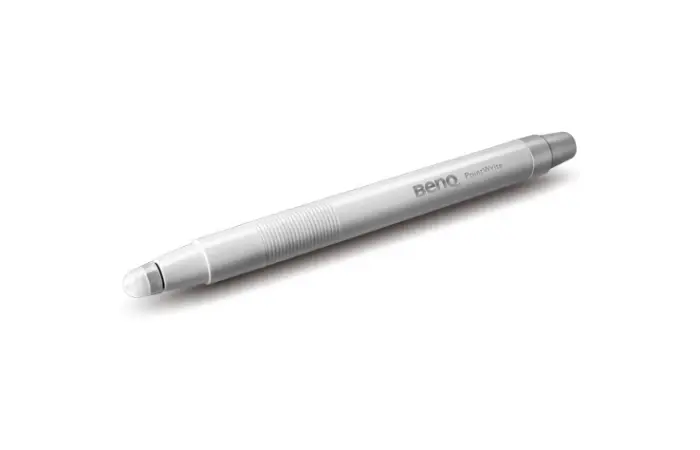
BenQ PW21U Interactive Learning Pen Touch Module
Tell us how many and where — we’ll send your best price.
Quotes within 1 working day
- Original manufacturer warranty
- Free delivery over AED 2,500
- Installation available
- Returns for manufacturer faults
The lowdown
The lowdown
Key features
- Professional design
- Reliable performance
- Flexible deployment
- Fast delivery
Enabling Interactive Learning PointWrite Interactivity PointWrite technology can transform BenQs education projectors into collaborative platforms that turn any surface into an interactive whiteboard. Seamless integration of PointWrite Kit PW21U and QWrite software with BenQ projectors encourages a truly collaborative learning environment.
FAQ
What are the payment and delivery options?
We offer flexible payment terms and fast delivery across the UAE and all GCC countries. Contact us to discuss your specific requirements and timelines.
Can installation or training support be provided?
Yes, our team can coordinate installation, configuration, and training for institutional deployments. Request a quote to discuss your support needs.
Why buy from Procure
Procure.ae serves institutional and business buyers across the UAE and GCC with professional equipment, competitive pricing, and reliable delivery. Request a quote for bulk orders, volume discounts, and dedicated support.
Specs
Specifications
- Weight
- 0.45
- Color
- Black
- Country of Origin
- United Arab Emirates
- Brand
- BenQ
- Product Type
- Interactive Pen
FAQs (11)
Got questions?
11 answers below — or call us on +971 4 546 5041.
How do we use the BenQ PW21U pen touch module in interactive teaching?
The PW21U connects to interactive displays and projectors to enable touch-enabled learning, allowing teachers and students to write, annotate, and interact directly with lesson content. It transforms passive displays into collaborative tools for real-time classroom engagement and brainstorming.
Can students and teachers write simultaneously with the pen touch module?
Yes, the PW21U is designed for multi-user interaction, enabling multiple teachers and students to annotate, draw, and contribute to lessons at the same time. This supports group problem-solving and collaborative learning across the entire classroom.
What teaching software works best with the BenQ interactive pen module?
The pen module integrates with most interactive whiteboard software and learning management systems that support touch input. Contact Procure.ae to confirm compatibility with your specific teaching applications and platforms.
How do we care for the interactive pen touch surface to ensure accuracy?
Clean the touch surface regularly with a soft, dry cloth to prevent dust and residue buildup that can affect sensitivity. Avoid using harsh chemicals or abrasive materials; for stubborn marks, use a slightly damp cloth and let it dry completely before use.
Is the PW21U pen touch module suitable for large classrooms or lecture halls?
The module works well in medium to large classrooms when paired with appropriately sized displays or projection systems. For lecture halls with very large audiences, additional displays or projection zones may be needed to ensure all students can see interactive content clearly.
Do teachers need special training to use the pen touch module effectively?
Basic training is helpful to familiarize staff with multi-touch gestures, software features, and best practices for interactive lessons. Most teachers adapt quickly, and Procure.ae can advise on training resources and support options during setup.
What is the typical delivery timeframe for the PW21U pen touch module to UAE schools?
Delivery times vary based on current availability and school location. Contact Procure.ae to request a quote and confirm the lead time for your order.
Does Procure.ae provide installation and calibration support for the pen touch module?
Procure.ae can advise on installation requirements and connect you with support resources. Contact the team to discuss your specific setup needs and available assistance options.
What components are included in the BenQ PW21U package?
The pen touch module is supplied as a complete interactive module. For a full list of included cables, software, and documentation, contact Procure.ae to confirm what comes with your order.
Does the BenQ PW21U come with a warranty?
Yes, BenQ products typically include a manufacturer warranty. Contact Procure.ae for specific warranty terms, coverage details, and after-sales support options available in your region.
How does the PW21U pen touch module compare to other interactive teaching solutions?
The PW21U offers precise touch input and multi-user support designed specifically for collaborative learning environments. For detailed comparisons with other solutions, contact Procure.ae to discuss your school's teaching methods and classroom setup.
Reviews
Customer reviews
Used this product? Tell other buyers what you think.
Sign in to review