 New in
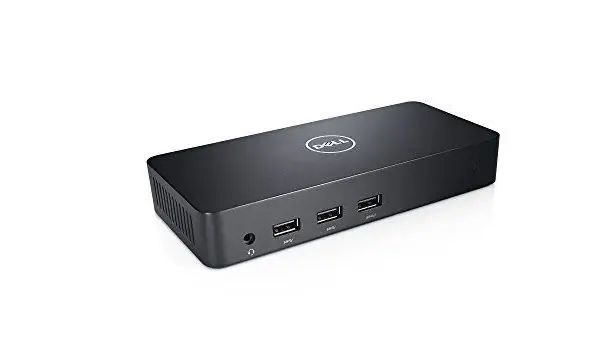
Dell D3100 Superspeed Docking Station USB 3.0
In stock · Usually ships in 1–5 business days*
- Original manufacturer warranty
- Free delivery over AED 2,500
- Installation available
- Returns for manufacturer faults
The lowdown
The lowdown
Key features
- Single USB 3.0 cable connection to laptop — no external power required
- Supports one 4K Ultra HD display and two Full HD displays simultaneously
- Three USB 3.0 ports for high-speed data transfer (SuperSpeed USB)
- Two USB 2.0 ports for additional peripherals and charging
- USB charge port for external device charging
- Expanded desktop workspace for increased productivity
- Universal compatibility with USB 3.0-equipped laptops
The Dell D3100 Superspeed Docking Station is a USB 3.0-powered universal dock that connects laptops to multiple displays and peripherals via a single cable. With support for Ultra HD 4K resolution on one display and Full HD on two additional monitors, it significantly enhances desktop productivity.
FAQ
Does this dock require external power?
No, the D3100 is powered via the USB 3.0 connection from your laptop.
Can I use all three displays on a single laptop?
Yes, the dock supports simultaneous connection of one 4K and two Full HD displays.
Why buy from Procure
Procure.ae supplies docking solutions and portable peripherals to business users and hot-desk environments across the UAE and GCC. Request a quote for docking station orders and multi-display setup support.
Specs
Specifications
- Video Support
- One 4K Ultra HD display, two Full HD displays
- USB 3.0 Ports
- 3
- USB 2.0 Ports
- 2
- Data Transfer Speed
- SuperSpeed USB (up to 5 Gbps)
- Power Supply
- Bus-powered via USB
- Weight
- 0.45 kg
- Color
- Black
- Brand
- Dell
- Product Type
- Docking Station
- Country of Origin
- United Arab Emirates
FAQs (11)
Got questions?
11 answers below — or call us on +971 4 546 5041.
How is the D3100 superspeed docking station different from modern USB-C docks?
The D3100 uses USB 3.0 technology (vs. newer USB-C or Thunderbolt), making it compatible with older laptop models and devices with USB Type-A connections common in legacy corporate equipment.
Can the D3100 handle the combined video and power load of four displays and active charging?
The D3100 supports one 4K display and two Full HD displays plus USB peripherals; confirm with Procure.ae whether simultaneous charging and this multi-display setup meets your power budget.
What USB 3.0 peripherals can be connected for data transfer and device charging?
The dock includes multiple USB 3.0 ports for external hard drives, printers, and mobile device charging; confirm with Procure.ae the exact port count and power specifications for your devices.
Is the D3100 suitable for office workers transitioning from desktop to hybrid work?
Yes; the dock enables quick connection of legacy office equipment (older monitors, USB devices, printers) without requiring new peripherals, making it cost-effective for hybrid migrations.
How does USB 3.0 docking compare to USB-C for data transfer speeds?
USB 3.0 supports up to 5 Gbps transfer speeds, suitable for most office work; contact Procure.ae if high-speed data backup or large file transfers require faster connectivity.
Can the D3100 daisy-chain with other USB hubs to expand connectivity further?
Yes; additional USB 3.0 hubs can be connected to the dock's USB ports if more device connections are needed beyond the built-in port count.
What are lead times for USB 3.0 docking station delivery to UAE corporate locations?
Procure.ae supplies Dell docking stations across the UAE and GCC. Contact the team with your office locations and deployment timeline to confirm availability.
Do you assist with docking station configuration for multi-display setups?
Procure.ae supports institutional customers with technical setup guidance; reach out to discuss display configuration, driver installation, and compatibility verification for your equipment.
What is included in the D3100 Superspeed Docking Station package?
The dock includes the docking station and connecting cables; confirm with Procure.ae whether a USB power adapter, display adapters, or additional peripherals are bundled.
What types of display connections does the D3100 support?
Contact Procure.ae to confirm the exact video output connectors (HDMI, DVI, VGA) on the D3100 and what adapters may be needed for your existing monitors.
Is the D3100 supported by Dell technical support and warranty?
Dell provides standard limited warranty on docking stations; contact Procure.ae to confirm coverage, support availability, and options for institutional bulk orders.
Reviews
Customer reviews
Used this product? Tell other buyers what you think.
Sign in to review