 New in
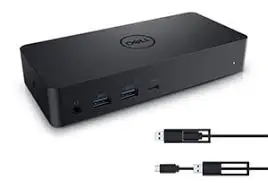
Dell D6000 Universal Docking Station USB-C
In stock · Usually ships in 1–5 business days*
- Original manufacturer warranty
- Free delivery over AED 2,500
- Installation available
- Returns for manufacturer faults
The lowdown
The lowdown
Key features
- DisplayLink technology for universal compatibility with USB-C devices
- Supports three 4K displays simultaneously or one 5K display
- Single USB-C cable for video, data, and power (up to 65W laptop charging)
- Plug-and-play setup — no external drivers required for basic functionality
- Four USB 3.0 ports for external storage and peripherals
- Gigabit Ethernet port for network connectivity
- Speaker output and combo audio jack
- Kensington lock slot for security
The Dell D6000 Universal Dock is a USB-C docking solution with DisplayLink technology, enabling single-cable connectivity across a wide range of PC and Mac systems. With support for multiple 4K displays and comprehensive port options, it extends the capabilities of portable devices in any workspace.
FAQ
Does this dock work with MacBooks?
Yes, the D6000 is compatible with any MacBook with USB-C and DisplayPort Alt Mode.
Can I use it with non-USB-C devices?
No, this dock requires a native USB-C connection with DisplayPort Alt Mode.
Why buy from Procure
Procure.ae supplies universal docking solutions for mobile workforces and shared desk environments across the UAE and GCC. Request a quote for bulk orders of D6000 docks and volume discounts.
Specs
Specifications
- Display Support
- Up to three 4K or one 5K
- USB Ports
- 4 × USB 3.0, 1 × USB-C
- Ethernet
- Gigabit
- Audio
- Speaker output, combo audio jack
- Power Delivery
- Up to 65W for laptops
- Weight
- 0.38 kg
- Color
- Black
- Brand
- Dell
- Product Type
- Docking Station
- Country of Origin
- United Arab Emirates
FAQs (11)
Got questions?
11 answers below — or call us on +971 4 546 5041.
How does the D6000 USB-C dock compare to the WD15 dock for multi-display productivity?
The D6000 uniquely supports up to three 4K displays or one 5K display through DisplayLink technology, making it superior for professionals requiring ultra-high-resolution multi-monitor workspaces compared to WD15's dual FHD or single 4K.
Is the D6000 compatible with non-Dell laptops and other manufacturers' devices?
Yes; the D6000 is truly universal, working with any laptop, tablet, or device featuring USB-C with DisplayLink support—not limited to Dell systems.
What video quality can be achieved with three 4K displays connected to the D6000?
The dock supports simultaneous 4K resolution on all three displays with DisplayLink technology; contact Procure.ae for refresh rate and colour depth specifications under your use case.
Does the D6000 provide sufficient power for charging high-performance laptops while powering multiple displays?
Contact Procure.ae to confirm the dock's power delivery capacity and whether it adequately charges your specific laptop model while supporting three 4K displays simultaneously.
How does single-cable DisplayLink connectivity improve workflow compared to traditional multi-cable setups?
DisplayLink allows USB-C to carry video, power, and data simultaneously, eliminating the need for separate HDMI, power, and USB cables—significant time savings for mobile professionals.
What peripherals and USB devices can be connected to the D6000 dock?
The dock includes multiple USB 3.0 ports for keyboards, mice, printers, and external drives. Contact Procure.ae to confirm the exact number of USB ports and any high-power device compatibility.
How quickly can the D6000 universal docking station be delivered to UAE offices?
Procure.ae supplies the D6000 across the UAE and GCC. Contact the team with your device specifications and timeline to confirm availability and delivery scheduling.
Does Procure.ae support setup and driver installation for USB-C docking stations?
Procure.ae assists institutional buyers with technical setup; reach out to discuss driver installation, display configuration, and compatibility verification for your devices.
What is included with the D6000 USB-C docking station?
The dock includes the docking station and USB-C cable; confirm with Procure.ae whether power adapter, display cables, or additional USB adapters are included in your order.
What power requirements does the D6000 dock have?
Contact Procure.ae to confirm the AC power specifications and charging capacity to ensure the dock can simultaneously power your laptop and multiple high-resolution displays.
What warranty and technical support does Dell provide on the D6000?
Dell docking stations carry standard limited warranty; contact Procure.ae to confirm coverage, technical support, and any extended protection options for universal dock deployments.
Reviews
Customer reviews
Used this product? Tell other buyers what you think.
Sign in to review