 New in
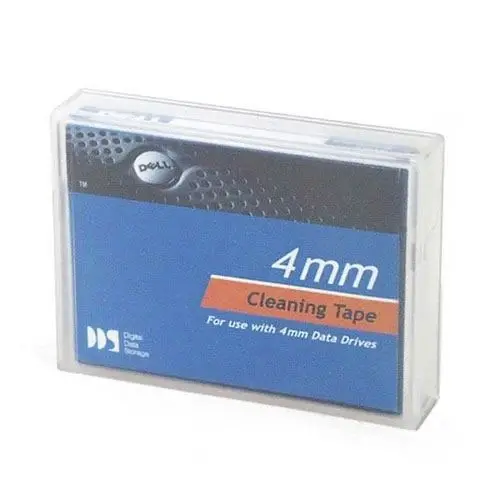
Dell LTO Tape Cleaning Cartridge Kit for LTO Ultrium Drives
In stock · Usually ships in 1–5 business days*
- Original manufacturer warranty
- Free delivery over AED 2,500
- Installation available
- Returns for manufacturer faults
The lowdown
The lowdown
Key features
- Dry-process cleaning method with no flammable materials for safe media room use
- Compatible with all LTO Ultrium tape drives
- Corrects temporary recording and read errors caused by head contamination
- Suitable for both scheduled maintenance and on-demand use when the drive requests cleaning
- Tested and validated for Dell systems, supported by Dell Tech Support
- Media Format: LTO-1 Ultrium
The Dell LTO Tape Cleaning Cartridge Kit is a maintenance consumable for LTO Ultrium tape drives, designed to address and prevent temporary recording and read errors caused by head contamination. Using a safe dry-process cleaning method that involves no flammable materials, it provides a clean recording gap with each use. Regular use on a scheduled cycle, or when requested by the drive, helps maintain long-term reliability of tape backup systems.
FAQ
Q: How often should I use the LTO tape cleaning cartridge?
A: Dell and APC recommend using the cleaning cartridge on a scheduled cycle and whenever the tape drive displays a cleaning request indicator.
Q: Is this cartridge compatible with LTO-2 or higher drives?
A: This cartridge is specified as LTO-1 format. Compatibility with higher-generation LTO drives should be confirmed with Dell or the drive manufacturer before use.
Why buy from Procure
Procure.ae provides data center consumables and tape backup accessories to organizations across the UAE and GCC. We support bulk and institutional procurement for IT maintenance programs with fast regional delivery. Contact us to request a quote for the Dell LTO Tape Cleaning Cartridge Kit.
Specs
Specifications
- Media Format
- LTO-1
- Cartridge Type
- Cleaning Cartridge
- Color
- White
- Weight
- 1 kg
- Compatible Drives
- All LTO Ultrium tape drives
- Package Type
- Retail
- Brand
- Dell
- Product Type
- Tape Cleaning Cartridge
FAQs (11)
Got questions?
11 answers below — or call us on +971 4 546 5041.
When should we use tape cleaning cartridges?
Dell LTO cleaning cartridges should be used during scheduled maintenance cycles to prevent read and write errors that accumulate over time in tape drives, extending drive lifespan and ensuring reliable backups.
How does dry-process cleaning improve tape drive performance?
The dry-process cleaning method removes residue and contaminants from tape heads without harsh chemicals, correcting temporary read and write errors and restoring normal drive function.
How often should we run cleaning cycles on our LTO tape drives?
Cleaning frequency depends on tape volume and drive usage; manufacturers typically recommend cleaning every 4-8 weeks or when error rates increase; contact Procure.ae for guidance on your specific environment.
Are these cleaning cartridges compatible with all LTO Ultrium drives?
This cleaning cartridge is validated for Dell systems and designed for all LTO Ultrium tape drives; contact Procure.ae to confirm compatibility with your specific drive models.
Can contaminated tape drives damage our data?
Heavily contaminated drives may produce read/write errors, potentially risking data integrity; preventive cleaning cycles minimize this risk and maintain backup reliability.
Is there a shelf life for cleaning cartridges?
Cleaning cartridges maintain effectiveness when stored properly in dry conditions; contact Procure.ae for storage recommendations and shelf life details.
How quickly can Procure.ae deliver cleaning cartridges in the UAE?
Procure.ae supplies tape maintenance products across the UAE and GCC; contact the team to request a quote and confirm lead times for your order.
Can Procure.ae help us establish a preventive maintenance schedule?
Procure.ae can advise on scheduled maintenance best practices and help you plan tape drive upkeep; discuss your backup infrastructure when requesting a quote.
What is the dry-process cleaning method, and why is it used?
Dry-process cleaning uses no flammable materials or harsh solvents to safely remove contaminants from tape heads, making it safe for operators and effective for maintaining drive reliability.
How many cleaning cycles can one cartridge provide?
Cleaning cartridge capacity depends on drive contamination levels; contact Procure.ae for specifications on expected cleaning cycles per cartridge.
Does this cleaning cartridge come with a technical support package?
Dell-validated cartridges typically include Dell Technical Support eligibility; contact Procure.ae to confirm support terms and procedures when using this product.
Reviews
Customer reviews
Used this product? Tell other buyers what you think.
Sign in to review