 New in
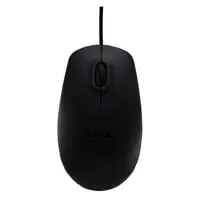
Dell MS111 USB 3-Button Optical Mouse
In stock · Usually ships in 1–5 business days*
- Original manufacturer warranty
- Free delivery over AED 2,500
- Installation available
- Returns for manufacturer faults
The lowdown
The lowdown
Key features
- Optical LED tracking with 1000 DPI resolution
- 3-button design with scroll wheel for intuitive navigation
- Wired USB connectivity; plug-and-play operation
- Ambidextrous design suitable for right and left-handed users
- Compatible with Windows and most operating systems
- Lightweight and portable for office or travel use
The Dell MS111 USB optical mouse delivers reliable, accurate tracking with a simple 3-button design and integrated scroll wheel. Its universal compatibility and comfortable ergonomics make it a practical choice for any desktop or laptop workstation.
FAQ
Is the MS111 mouse suitable for left-handed users?
Yes, the mouse has an ambidextrous design suitable for both right and left-handed users with equal comfort.
Are replacement cables available?
Contact Procure.ae for availability of replacement cables and spare parts.
Why buy from Procure
Procure.ae supplies IT peripherals and accessories to offices, schools, and institutions across the UAE and GCC. Request a quote for bulk orders and volume discounts.
Specs
Specifications
- Device Type
- Mouse
- Connectivity
- Wired USB
- Detection Technology
- Optical
- DPI Resolution
- 1000 DPI
- Buttons
- 3
- Interface
- 4-pin USB Type A
- Color
- Black
- Brand
- Dell
- Product Type
- Optical Mouse
FAQs (11)
Got questions?
11 answers below — or call us on +971 4 546 5041.
What type of work environment is the Dell optical mouse best suited for?
These mice are ideal for office professionals, data entry clerks, and administrative staff who require reliable cursor control and all-day comfort.
How does 1000 DPI tracking benefit everyday office work?
The 1000 DPI optical tracking delivers precise cursor movement for spreadsheet navigation, document editing, and general computer tasks without oversensitivity.
Can the wired USB connection be used with laptops in an office setup?
Yes, the wired USB connection works with any laptop or desktop with a USB port, making it suitable for both fixed desks and docking stations.
Is the 3-button design with scroll wheel suitable for lengthy typing and clicking sessions?
Yes, the scroll wheel reduces the need for keyboard navigation, and the 3-button layout supports common office applications with ergonomic efficiency.
How does the optical sensor handle different desk surfaces in busy office environments?
Optical sensors work reliably on most surfaces; for best tracking on reflective or glass desks, a mousepad is recommended.
What tasks are easier with the scroll wheel compared to keyboard shortcuts?
The scroll wheel speeds up document scrolling, web browsing, and spreadsheet navigation, reducing repetitive keyboard use and improving comfort.
Can Procure.ae ship the Dell optical mouse to offices across the UAE and GCC?
Yes, Procure.ae supplies these mice across the UAE and GCC; contact the team for current lead times and availability.
What is the typical lead time for ordering the Dell optical mouse from Procure.ae?
Lead times vary; request a quote from Procure.ae for your specific order to confirm delivery timeframe.
What is the DPI specification and connectivity type of the Dell optical mouse?
These models feature 1000 DPI optical tracking and wired USB connectivity for reliable, precise cursor control.
What buttons and controls does the Dell optical mouse include?
The mouse includes 3 buttons and a scroll wheel, providing standard navigation controls for office and productivity applications.
Does the Dell optical mouse include a warranty or support from Procure.ae?
Contact Procure.ae for warranty details and support options when placing your order.
Reviews
Customer reviews
Used this product? Tell other buyers what you think.
Sign in to review