 New in
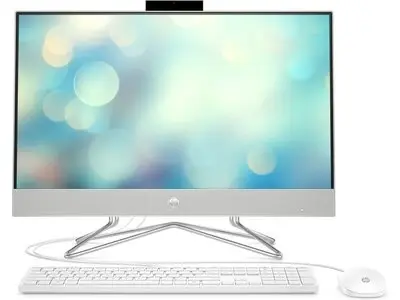
HP All-in-One PC 24-dp1021ne Touchscreen 23.8" FHD Silver
- 1TB HDD
In stock · Usually ships in 1–5 business days*
- Original manufacturer warranty
- Free delivery over AED 2,500
- Installation available
- Returns for manufacturer faults
The lowdown
The lowdown
Key features
- 23.8" FHD IPS anti-glare display
- Intel i7 processor
- 8GB DDR4-3200 MHz RAM
- 1TB HDD storage
- Pop-up privacy camera
- USB and HDMI ports
- Upgradeable design
The HP 24-dp1021ne all-in-one PC combines a large 23.8" FHD display with powerful internal hardware. Ideal for office, creative work, and business computing in the UAE and GCC.
FAQ
Is it upgradeable?
Yes, removable panel allows easy memory and storage upgrades.
Can I order in bulk?
Yes, request a quote for volume pricing and delivery arrangements.
Why buy from Procure
Procure.ae supplies computing hardware to institutional and corporate buyers across the UAE and GCC. Request a quote for competitive pricing and fast delivery.
Specs
Specifications
- Processor
- Intel® Core™ i7-1165G7 (up to 4.7 GHz with Intel® Turbo Boost Technology, 12 MB L3 cache, 4 cores, 8 threads)
- RAM
- 8GB DDR4
- Storage
- 1TB HDD
- Display
- 23.8" FHD IPS
- Graphics
- INTEL IRIS XE
- Operating System
- DOS
- Color
- Silver
- Weight
- 5.85 kg
- Brand
- HP
- Product Type
- All In One Pc
- Country of Origin
- United Arab Emirates
- Ports & Connectors
- 1 SuperSpeed USB Type-A 5Gbps signaling rate 2 SuperSpeed USB Type-A 5Gbps signaling rate 2 USB 2.0 Type-A 1 HDMI-out 1.4 1 headphone/microphone combo 1 RJ-45
- Power Consumption
- 90 W Smart AC power adapter
FAQs (11)
Got questions?
11 answers below — or call us on +971 4 546 5041.
How does a touchscreen benefit professionals doing customer presentations?
Touchscreen capability allows presenters to interact directly with slides, annotate content in real-time, and navigate presentations intuitively—useful for sales, consulting, and training roles.
Is the touchscreen responsive enough for handwriting or note-taking?
Touchscreen responsiveness supports basic note-taking and annotations. Professional handwriting recognition may require dedicated stylus support; contact Procure.ae for pen compatibility details.
What applications benefit most from touchscreen capability on this PC?
Touchscreen excels with web browsers, touch-optimized apps, collaborative software, digital whiteboards, and presentation tools. Traditional desktop applications work as expected via keyboard and mouse.
How often should the touchscreen be cleaned to maintain functionality?
Clean the touchscreen regularly with a soft, dry microfiber cloth to remove fingerprints and dust. Avoid harsh chemicals or excessive moisture which can damage the screen.
Does touchscreen wear out over time with heavy use?
Quality touchscreens are designed for long-term use and remain reliable with proper care. Heavy or improper use can degrade responsiveness, so educate users on careful handling.
Is the silver touchscreen finish easier to maintain than white or black?
Silver finishes generally hide fingerprints and dust moderately well compared to white or pure black. Regular gentle wiping maintains appearance without special products.
What is the typical setup time for a new touchscreen all-in-one PC?
Setup is straightforward—power on, connect to network, and install updates. Touchscreen drivers are pre-installed; calibration is rarely needed. Procure.ae can advise on regional setup support.
Does Procure.ae provide training on using the touchscreen features?
Training is not standard, but Procure.ae can coordinate with IT support for your organization. Most users find touchscreens intuitive.
Is the 23.8-inch touchscreen size appropriate for interactive use?
Yes, 23.8 inches is a good size for touchscreen use—large enough for comfortable interaction but manageable for arm reach. Larger displays may be tiring to use with touch.
What touch technology is used—capacitive, resistive, or infrared?
Modern all-in-one touchscreens typically use capacitive technology for responsive, multi-touch capability. Contact Procure.ae to confirm the specific touch technology.
How many simultaneous touch points does the screen support?
Most modern capacitive touchscreens support at least 10 simultaneous touch points, enabling multi-touch gestures. Confirm this capability with Procure.ae.
Reviews
Customer reviews
Used this product? Tell other buyers what you think.
Sign in to review