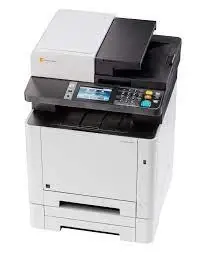
 New in
Kyocera Triumph-Adler P-C2655w MFP A4 Monochrome Multifunction
- Digital Desktop
- Optional
Tell us how many and where — we’ll send your best price.
Quotes within 1 working day
- Original manufacturer warranty
- Free delivery over AED 2,500
- Installation available
- Returns for manufacturer faults
The lowdown
The lowdown
Key features
- 26 ppm A4 copying and printing in monochrome
- Integrated scanning and faxing for complete document workflows
- Automatic document processor for efficient batch operations
- Flexible paper handling: 50–160 g/m² (standard to cardstock)
- Optional wireless connectivity (Wi-Fi) for network access
- Professional print quality for business documents and correspondence
The Kyocera Triumph-Adler P-C2655w MFP is a reliable A4 monochrome multifunction printer designed for medium-volume office environments. At 26 ppm, it combines professional copying and printing with integrated scanning and faxing, supported by flexible paper handling and an automatic document processor for efficient batch operations.
FAQ
What is the maximum print speed of the P-C2655w?
The P-C2655w operates at 26 ppm for A4 documents in monochrome.
What paper types can the P-C2655w handle?
The unit accepts paper from 50 to 160 g/m² and supports various specialty media through its automatic document processor.
Why buy from Procure
Procure.ae supplies versatile multifunction printers to SMEs, professional offices, and institutional departments across the UAE and GCC. Request a quote for wireless models, volume pricing, and ongoing consumable agreements.
Specs
Specifications
- Print Technology
- Laser (Monochrome)
- Print Speed
- 26 ppm (A4)
- Functions
- Copy, Print, Scan, Fax
- Max Paper Size
- A4 (210 × 297 mm)
- Duplex
- No
- Connectivity
- Ethernet, USB, Optional Wi-Fi
- Weight
- 26 kg
- Dimensions
- 495 × 417 × 429 mm
- Paper Handling
- 50–160 g/m² (ADP), Automatic Document Processor
- Country of Origin
- United Arab Emirates
- Brand
- Kyocera Triumph Adler
- Product Type
- Mono Mfp
- Wireless
- No
- Color Printer
- No
- Copier
- Yes
- Dimension
- 495 x 417 x 429 mm
- Fax
- Optional
- Print Speed (Mono)
- 50 sheet A4 (standard, A6R-A4), 50-160 g/m² (automatic document processor)
- Printer Type
- Digital Desktop
FAQs (11)
Got questions?
11 answers below — or call us on +971 4 546 5041.
What workflows does a 26 ppm A4 multifunction device support?
Offices with moderate printing (20,000-40,000 pages monthly), flexible paper needs, and shared copy-print-scan-fax tasks benefit from the P-C2655w's compact, versatile design.
How does flexible paper handling enable document output variety?
The 50-160 g/m² range enables printing on light bond, standard office stock, cardstock, and specialized media, supporting proposals, certificates, envelopes, and branding materials within one device.
What role does the automatic document processor play in large scanning projects?
The ADP speeds up batch digitization by auto-feeding multiple pages, eliminating manual page-by-page scanning and significantly reducing the time to convert physical archives into digital files.
Is 26 ppm adequate for a shared departmental printer, or should we upgrade?
At 26 ppm, a 100-page job takes approximately 4 minutes. Suitable for departments printing intermittently; high-traffic office-wide printing may benefit from a faster 40+ ppm device.
What cost efficiencies does the P-C2655w bring to a small business?
By consolidating copy, print, scan, and fax into one device, the P-C2655w eliminates multiple machine purchases, reducing capital spending, floor space, and maintenance complexity.
Can the P-C2655w sustain continuous operation during busy seasons?
The P-C2655w is designed for moderate daily volumes. During peak seasons, monitor usage and plan additional device capacity or outsource high-volume printing to avoid premature wear.
What lead time should we expect for the P-C2655w in the UAE or wider GCC?
Contact Procure.ae with your location to receive a specific delivery timeframe and quotation for the P-C2655w.
What installation support does Procure.ae provide for the P-C2655w?
Procure.ae offers guidance on setup, network integration, and initial configuration. Arrange support details during your quotation request.
What scanning capabilities does the P-C2655w include?
The P-C2655w features an automatic document processor for rapid batch scanning and can digitize to email, USB, or cloud destinations. Contact Procure.ae for precise scanning speed.
Are replacement toner and waste bottles included with the P-C2655w?
Confirm with Procure.ae whether starter consumables are included or priced separately at purchase.
What warranty protection applies to the P-C2655w?
Kyocera's standard warranty covers defects in materials and workmanship. Request detailed warranty terms and service options from Procure.ae.
Reviews
Customer reviews
Used this product? Tell other buyers what you think.
Sign in to review