 New in
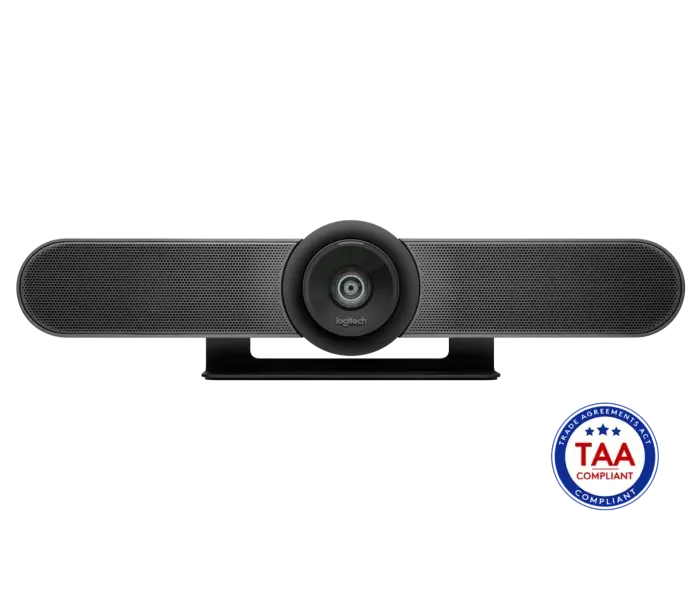
Logitech MeetUp 4K Ultra HD Conference Camera
Tell us how many and where — we’ll send your best price.
Quotes within 1 working day
- Original manufacturer warranty
- Free delivery over AED 2,500
- Installation available
- Returns for manufacturer faults
The lowdown
The lowdown
Key features
- 4K Ultra HD video with ultra-wide motorized lens—captures everyone in small rooms without fisheye distortion
- RightSight computer vision automatically adjusts camera position and zoom to frame all participants
- Three advanced beamforming microphones capture speech while suppressing background noise
- Custom-tuned speaker with full-duplex audio ensures natural, clear conversations
- Two-way table stand and wall-mount options—minimal cabling, maximum flexibility
- USB plug-and-play connectivity: no additional software required
- Compatible with virtually all video conferencing platforms (Zoom, Teams, Google Meet, Webex, etc.)
- Compact form factor designed for tight spaces and huddle rooms
The Logitech MeetUp is a plug-and-play 4K conference camera purpose-built for small meeting rooms and huddle spaces. Its ultra-wide motorized lens, integrated audio with beamforming microphones, and RightSight computer vision technology create a complete, minimal-cabling solution that reduces setup complexity and maximises usable meeting space.
FAQ
Does the MeetUp work without additional software?
Yes, it connects via USB and works plug-and-play with any compatible video platform; no drivers or special software needed.
How wide is the field of view?
The ultra-wide motorized lens captures the entire small room or huddle space without distortion, making it ideal for groups of 4–6 people.
Why buy from Procure
Procure.ae supplies conference cameras and meeting room technology to businesses, government agencies, and educational institutions across the UAE and GCC. Request a quote for deployment support and managed services.
Specs
Specifications
- Resolution
- 4K Ultra HD
- Lens
- Ultra-wide motorized
- Camera Features
- RightSight computer vision auto-framing
- Microphones
- 3 advanced beamforming
- Speaker
- Custom-tuned with full-duplex audio
- Connectivity
- USB
- Mounting
- Table stand or wall mount (included)
- Compatible Platforms
- Zoom, Teams, Google Meet, Webex, and other USB-compatible systems
- Dimensions
- 73.3 × 469.2 × 73 mm
- Operating Temperature
- 0–40°C
- Color
- Black
- Weight
- 1.04 kg
- Sensitivity
- 83 dB SPL at 1W, 1m
- Brand
- Logitech
- Product Type
- Video Bar
- Country of Origin
- China
- Sensitivity (SPL / 1 W @ 1 m)
- 83 dB SPL @1W +/-2dB @ 1 meter
FAQs (11)
Got questions?
11 answers below — or call us on +971 4 546 5041.
Why is a 4K conference camera important for large huddle rooms and executive briefing spaces?
4K resolution captures finer detail, ensuring remote participants see participants clearly regardless of room size, critical for high-stakes meetings and presentations.
How does the motorized ultra-wide lens adapt to different room layouts?
The motorized lens adjusts zoom and focus automatically, optimizing framing without manual intervention—ideal for varying room configurations and participant distances.
What does RightSight computer vision technology accomplish during meetings?
Automatic participant detection and framing ensures optimal composition throughout the meeting, keeping everyone in view regardless of movement or positioning changes.
How does the beamforming microphone array improve audio clarity in large rooms?
Beamforming focuses microphone sensitivity in the direction of speakers while suppressing background noise, delivering clear, natural audio from across the room.
Is the custom-tuned speaker adequate for remote participants to hear clearly?
The integrated speaker provides room coverage for most huddle and mid-size conference rooms; larger spaces may benefit from supplemental audio systems.
Which enterprise platforms does the MeetUp 4K work with for seamless integration?
It integrates with major platforms including Zoom, Microsoft Teams, and Google Meet; confirm your specific platform requirements with Procure.ae.
What is the delivery lead time for the MeetUp 4K to meeting rooms across the GCC?
Contact Procure.ae for current availability and delivery timelines to your locations.
Does the MeetUp 4K require specialized installation or can IT handle standard setup?
Basic USB installation is straightforward; however, confirm any IT configuration needs for your meeting infrastructure with Procure.ae.
What is the maximum and minimum zoom capability of the motorized lens?
Please contact Procure.ae to confirm zoom range and how autofocus adapts to varying distances.
What warranty and technical support does Logitech provide for the MeetUp 4K?
Logitech includes a manufacturer's warranty on professional conference equipment; confirm coverage and support options with Procure.ae.
What cables, adapters, and mounting options come with the MeetUp 4K?
Contact Procure.ae to confirm the included USB cables, power supplies, and wall or monitor mounting brackets.
Reviews
Customer reviews
Used this product? Tell other buyers what you think.
Sign in to review