 New in
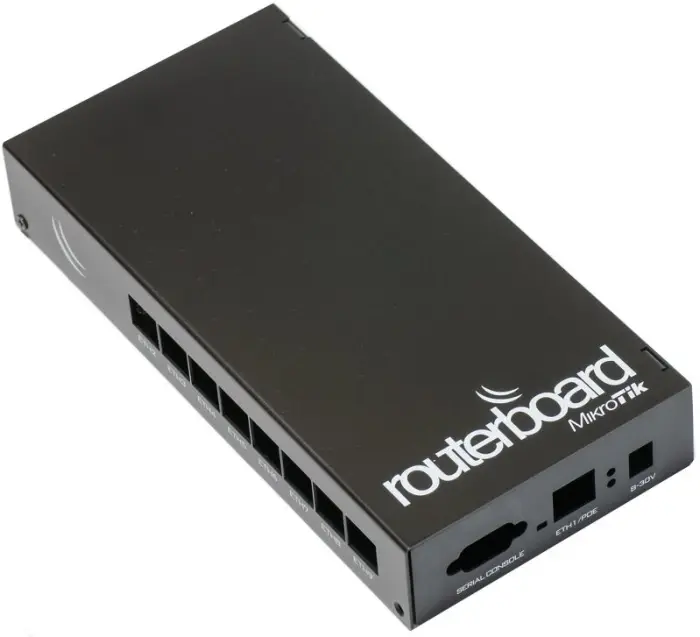
MikroTik CA493 Aluminium Indoor Case RouterBoard
In stock · Usually ships in 1–5 business days*
- Original manufacturer warranty
- Free delivery over AED 2,500
- Installation available
- Returns for manufacturer faults
The lowdown
The lowdown
Key features
- Premium black aluminium construction for durability and professional aesthetics
- Three mounting holes for N-female bulkhead connectors or AC/SWI swivel antennas
- Increased internal height to support a broader range of miniPCI card models
- Compatible with various MikroTik RouterBoard series
- Compact, wall-mountable design suitable for offices and small facilities
- Thermal properties of aluminium help manage heat dissipation from RouterBoard electronics
- Multiple sticker faceplate options for custom port labeling
The MikroTik CA493 aluminium indoor case provides a robust, professional enclosure for RouterBoard deployments requiring flexible antenna and connector configurations. The elevated design accommodates a wider selection of miniPCI expansion cards compared to earlier case models, making it suitable for access point installations, network appliances, and remote site routers in commercial, educational, and institutional settings.
FAQ
What antenna types are compatible with the three antenna ports?
The three mounting holes accept N-female bulkhead connectors and AC/SWI format swivel antennas. Various antenna styles and manufacturers produce compatible options.
Can the CA493 case fit all MikroTik RouterBoard models?
The CA493 is designed for standard MikroTik RouterBoard series. Its increased height accommodates more miniPCI card variants. For specific model compatibility, contact Procure.ae or consult MikroTik documentation.
Why buy from Procure
Procure.ae supplies MikroTik RouterBoard accessories and networking enclosures to system integrators, service providers, and IT teams across the UAE and GCC. Request a quote for bulk quantities and volume pricing.
Specs
Specifications
- Material
- Black Aluminium
- Form Factor
- Compact Indoor Enclosure
- Antenna/Connector Ports
- 3 (N-female bulkhead or AC/SWI swivel antennas)
- Height Design
- Increased for wider miniPCI compatibility
- Wall-Mountable
- Yes
- Weight
- 0.45 kg
- Colour
- Black
- Country of Origin
- United Arab Emirates
- Brand
- MikroTik
- Product Type
- Router Enclosure
FAQs (11)
Got questions?
11 answers below — or call us on +971 4 546 5041.
What RouterBOARD models are compatible with the CA493 enclosure?
The CA493 is designed for RouterBoards with standard antenna mounting. Verify your specific RouterBOARD model is compatible before purchasing; contact Procure.ae to confirm compatibility with your equipment.
How do the three antenna mount holes simplify field installation?
Three dedicated mounting holes allow installation of N-female bulkhead connectors or AC/SWI swivel antennas without drilling additional holes. This pre-engineered design accelerates outdoor deployment.
What does the improved height design accomplish for miniPCI cards?
The increased internal height accommodates a broader range of miniPCI expansion cards (modems, wireless adapters, etc.) that may not fit in older, shallower enclosures. This flexibility extends the useful life of the enclosure as equipment evolves.
Why is an aluminium case preferable for outdoor RouterBOARD installation?
Aluminium provides lightweight but durable protection from dust, weather, and impacts. It dissipates heat better than plastic, maintaining optimal operating temperature for the RouterBOARD inside.
Can the CA493 be wall-mounted, pole-mounted, or installed in equipment racks?
The compact aluminium construction suits various mounting orientations. Verify your intended mounting location and contact Procure.ae to discuss any required brackets or additional hardware.
Is the black aluminium finish suitable for outdoor UAE deployment?
Black aluminium resists UV fade better than lighter colours. In extreme desert heat and direct sun, additional ventilation or shading may improve equipment longevity.
What are typical delivery timelines for RouterBOARD enclosures in the GCC?
Enclosures typically have shorter lead times than large routers. Contact Procure.ae for current stock status and delivery to your location.
Does Procure.ae assist with mounting and installation of router enclosures?
Procure.ae delivers the enclosure with installation hardware. Most customers install it themselves; reach out with technical questions about mounting or antenna routing.
What is the design purpose of the CA493 black aluminium case?
The CA493 houses RouterBoards with antenna integration and supports miniPCI expansion cards. The improved height design accommodates modern expansion card profiles, making it versatile for diverse RouterBOARD configurations.
How many antenna connection points are provided and what types of antennas are supported?
The CA493 includes three mounting holes for N-female bulkhead connectors or AC/SWI swivel antennas. This flexibility enables configuration matching your specific coverage and installation requirements.
Is there warranty coverage for the CA493 enclosure?
MikroTik enclosures include manufacturer warranty; contact Procure.ae for specific warranty period and coverage details.
Reviews
Customer reviews
Used this product? Tell other buyers what you think.
Sign in to review