 New in
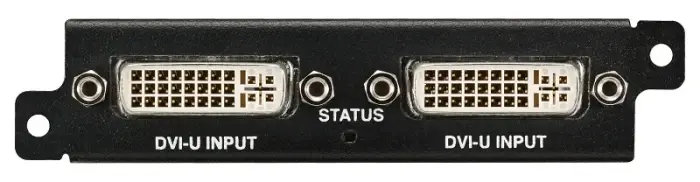
Panasonic ET-MCYDV100 DVI-U Interface Board (2 inputs for DVI-U Signals)
In stock · Usually ships in 1–5 business days*
- Original manufacturer warranty
- Free delivery over AED 2,500
- Installation available
- Returns for manufacturer faults
The lowdown
The lowdown
Key features
- Professional-grade construction
- Reliable AV connectivity
- Suitable for projection and display systems
Professional Panasonic interface cable for reliable AV connectivity in institutional and commercial environments. Engineered for signal integrity and durability.
FAQ
What are the connector types?
Please refer to specifications for connector details and confirm compatibility.
Are other lengths available?
Contact us to enquire about alternative cable lengths or custom specifications.
Why buy from Procure
Procure.ae supplies professional AV cabling to businesses and institutions across the UAE and GCC. Request a quote for bulk quantities, competitive pricing, and fast delivery.
Specs
Specifications
- Brand
- Panasonic
- Product Type
- Dvi Interface Board
- Weight (Spec)
- 0.45
- Color (Spec)
- Black
FAQs (11)
Got questions?
11 answers below — or call us on +971 4 546 5041.
What video signals does this DVI-U input board accept?
The ET-MCYDV100 provides two DVI-U inputs, allowing you to connect professional video sources, broadcast equipment, or computer systems to compatible Panasonic projectors with high-quality digital signal transmission.
Is this board ideal for broadcast or live event environments?
Yes, DVI-U inputs are widely used in broadcast facilities, live streaming setups, and professional event production. The dual inputs enable switching between multiple source feeds without powering down the projector.
Can both DVI-U inputs run simultaneously to create a blended image?
The interface board provides two separate digital inputs; typically only one feeds the projector display at a time. For image blending or advanced multi-source projection, consult Procure.ae about your system requirements.
What cable length is safe for DVI-U connections?
Keep DVI cables under 15 meters for reliable signal integrity, and use quality shielded cables to minimise interference. Longer runs may require signal boosters; contact Procure.ae for specific installation advice.
How do I switch between the two DVI-U inputs during operation?
Source switching is typically controlled via the projector’s menu or remote control. Refer to your projector’s user guide and contact Procure.ae if you need guidance on input management during live presentations.
Is this board compatible with HDCP-protected content?
DVI-U inputs can receive HDCP-protected signals depending on the projector model and source device. Verify your specific setup with Procure.ae to ensure full compatibility with protected content sources.
How long will delivery take for this interface board to my location in the GCC?
Lead times vary based on stock and destination. Contact Procure.ae to request a quote and receive a confirmed delivery timeline.
Does Procure.ae provide installation and system integration support?
Procure.ae supplies this professional interface board to institutional buyers across the UAE and GCC and can recommend or coordinate installation support for your project.
What is supplied with the ET-MCYDV100 board?
The package includes the DVI-U interface board with two inputs. For details on included cables, connectors, or documentation, contact Procure.ae to confirm the complete contents.
Is this board engineered for professional reliability?
Yes, the ET-MCYDV100 is a professional interface cable designed for AV and video installations where reliability and signal integrity are essential.
What warranty coverage applies to this interface board?
As a genuine Panasonic product, this board carries manufacturer warranty. Contact Procure.ae for specific warranty details and support terms.
Reviews
Customer reviews
Used this product? Tell other buyers what you think.
Sign in to review