 New in
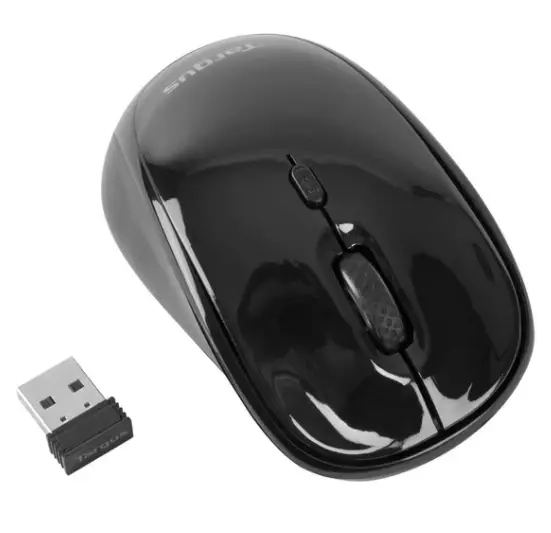
Targus AMW50EU-70 Wireless USB Laptop Trace Mouse
In stock · Usually ships in 1–5 business days*
- Original manufacturer warranty
- Free delivery over AED 2,500
- Installation available
- Returns for manufacturer faults
The lowdown
The lowdown
Key features
- 2.4GHz wireless technology operates reliably up to 15 metres away
- Integrated laser pointer for highlighting presentation content
- Backlit buttons for easy use in low-light presentation environments
- KeyLock technology locks non-essential buttons to prevent accidental activation during presentations
- Natural, ergonomic design for comfortable extended computing use
- USB receiver stores neatly inside the mouse for convenient transport
- Plug-and-play operation—no drivers required
- Compatible with PC, Mac, and netbook systems
The Targus AMW50EU-70 Wireless USB Laptop Trace Mouse bridges the gap between everyday computing and professional presentations. Designed to feel natural and comfortable in your hand, it provides reliable wireless connectivity and integrated presentation features for dynamic, engaging meetings.
FAQ
Can I use this mouse for gaming?
While the mouse works as a standard wireless mouse, it is optimised for productivity and presentations rather than gaming applications.
Is the laser pointer visible in a bright room?
The laser is visible in most conference rooms and classrooms; bright sunlight or very large venues may reduce visibility.
Why buy from Procure
Procure.ae supplies wireless presentation tools and laptop peripherals to corporate teams and educators throughout the UAE and GCC. Request a quote for bulk mouse orders and presentation setup bundles.
Specs
Specifications
- Connectivity
- 2.4GHz Wireless USB
- Range
- Up to 15 metres
- Features
- Laser Pointer, Backlit Buttons, KeyLock Technology
- Port Required
- USB
- Receiver Storage
- Built-in Housing Inside Mouse
- Compatibility
- Windows PC, macOS, Netbook
- Color
- Black
- Country of Origin
- United Arab Emirates
- Brand
- Targus
- Product Type
- Wireless Mouse
- Weight (Spec)
- 1
FAQs (11)
Got questions?
11 answers below — or call us on +971 4 546 5041.
Who should use a wireless mouse with built-in presentation controls?
Business presenters and trainers who move around the room during talks benefit from mice that combine navigation with slide-control and laser-pointer functions.
How does a wireless mouse with a laser pointer enhance presentations?
The integrated laser pointer highlights specific content on screen without needing a separate device, making your presentation more engaging and interactive.
What is KeyLock technology in a presentation mouse?
KeyLock prevents accidental button presses when the mouse is in a bag or pocket, avoiding unintended slide changes or laser flashes during transport.
Can a wireless presentation mouse be used for regular laptop navigation?
Yes, wireless presentation mice are fully functional for everyday computing tasks like browsing, editing, and document navigation between presentations.
How far can I move from my laptop with a wireless mouse?
Most 2.4 GHz wireless mice have a reliable range of 10 metres or more, allowing you to present or work comfortably away from your desk.
What's the trade-off between wireless and wired mice?
Wireless mice offer freedom of movement and cleaner desks but require battery management; wired mice eliminate batteries but introduce cable clutter.
How quickly can Procure.ae deliver this product to my location in the UAE or GCC?
Procure.ae supplies products on a request-a-quote basis; contact the Procure.ae team with your location and delivery timeframe for current lead times and availability.
Does Procure.ae offer installation or setup support for this product?
Procure.ae provides delivery and support services across the UAE and GCC; reach out to the team to discuss any setup assistance or technical support you may need with your order.
Does this wireless mouse have a laser pointer?
Yes, this mouse includes a built-in laser pointer for presentations and highlighting content on screen.
Does this mouse prevent accidental clicks?
Yes, KeyLock technology prevents accidental button presses when the mouse is stored or transported, avoiding unintended actions.
What wireless technology does this mouse use?
This mouse uses 2.4 GHz wireless technology for reliable, interference-resistant connectivity with most computers.
Reviews
Customer reviews
Used this product? Tell other buyers what you think.
Sign in to review