 New in
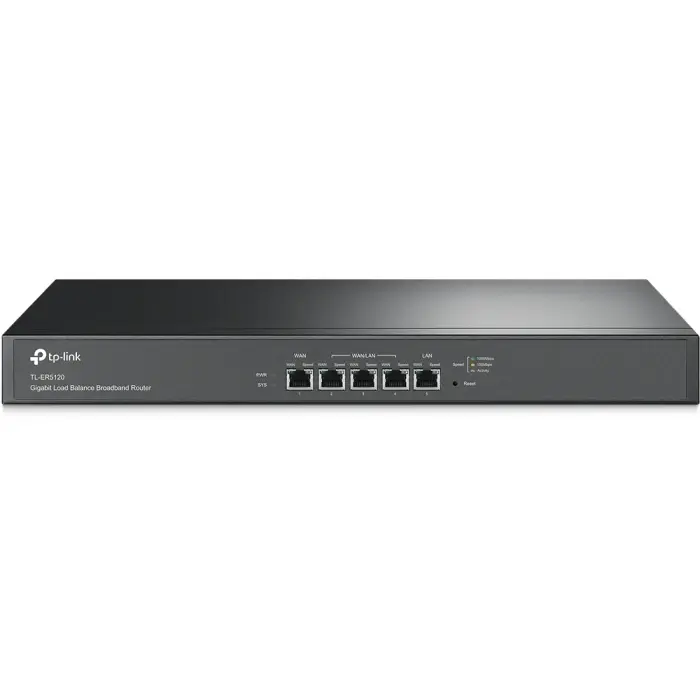
TP-Link TL-ER5120 Gigabit Load Balance Broadband Router
Tell us how many and where — we’ll send your best price.
Quotes within 1 working day
- Original manufacturer warranty
- Free delivery over AED 2,500
- Installation available
- Returns for manufacturer faults
The lowdown
The lowdown
Key features
- Gigabit Ethernet ports for high-speed network performance
- Load balancing across multiple WAN connections
- Access control and bandwidth management per user/group
- Denial of Service (DoS) attack protection
- PPPoE server for managed user access
- Web-based management interface for easy configuration
The TP-Link broadband router is engineered for small business and institutional networks requiring high-speed connectivity, security, and flexible WAN management. Gigabit ports and advanced features ensure reliable network uptime.
FAQ
Q: What is load balancing?
A: Load balancing distributes network traffic across multiple WAN connections, improving performance and providing failover redundancy.
Q: Can I use this for a large office network?
A: This router is optimised for small to medium businesses. Contact Procure.ae for larger network requirements.
Why buy from Procure
Procure.ae supplies enterprise-grade networking equipment to businesses and institutions across the UAE and GCC. Request a quote for small business deployments and dedicated technical support.
Specs
Specifications
- Type
- Broadband Router
- Connectivity
- Gigabit Ethernet
- WAN Ports
- Multiple (configurable)
- Features
- Load Balancing, Access Control, DoS Protection
- VPN Support
- No
- Color
- Black
- Brand
- TP Link
- Product Type
- Load Balance Broadband Router
- Weight (Spec)
- 0.45
- Country of Origin
- United Arab Emirates
FAQs (11)
Got questions?
11 answers below — or call us on +971 4 546 5041.
How does load balancing improve network performance for small businesses?
Load balancing distributes traffic across multiple internet connections, maximizing bandwidth utilization and improving resilience if one link fails—critical for business continuity.
What role does bandwidth management play in institutional networks?
Bandwidth management prioritizes critical applications (e.g., email, voice) while throttling non-essential traffic, ensuring consistent performance during peak usage in offices and schools.
How does access control in the TL-ER5120 protect institutional data?
Access control rules restrict network access to authorized devices and users, preventing unauthorized traffic and protecting sensitive data in government and educational environments.
Can the router handle multiple internet service providers (ISPs) simultaneously?
Yes, the gigabit load-balance router connects to multiple WAN connections, intelligently distributing traffic to optimize performance and provide failover if one ISP link fails.
What security features protect the network from external threats?
Built-in security protection includes firewall capabilities and access controls that defend against common attacks and intrusions, suitable for institutional and business deployments.
How easy is it to configure load balancing and bandwidth policies?
Configuration is typically performed through a web interface; specific setup complexity depends on your network topology—contact Procure.ae or TP-Link for detailed setup guidance.
What lead time should I expect for the TL-ER5120 in the UAE and GCC?
Procure.ae supplies the router on a request-a-quote basis; contact the team to confirm current stock and delivery timelines for your deployment schedule.
Does Procure.ae offer configuration or deployment support for load-balance routers?
Procure.ae can advise on product selection and deployment scenarios; for detailed configuration and network integration, consult TP-Link technical support or a network integrator.
What connectivity specifications does the TL-ER5120 provide?
The router delivers gigabit ethernet on LAN and WAN ports, supporting multiple internet connections; contact Procure.ae for exact port counts and interface details.
What is included in the box with the router?
The product description does not detail included accessories; contact Procure.ae to confirm what power adapter, cables, mounting hardware, and documentation are provided.
What warranty and support options are available?
Warranty details are not specified in the product information; contact Procure.ae to confirm TP-Link warranty coverage and technical support availability.
Reviews
Customer reviews
Used this product? Tell other buyers what you think.
Sign in to review