 New in
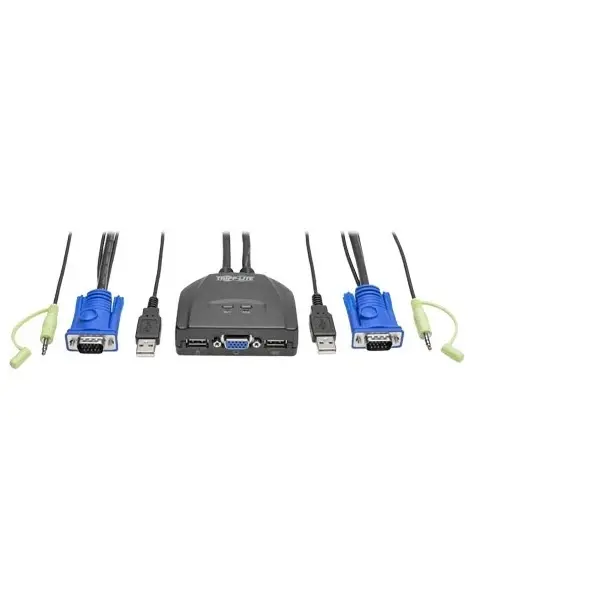
Tripp Lite 2-Port USB/VGA Cable KVM Switch with Audio, Cables and USB Peripheral Sharing
In stock · Usually ships in 1–5 business days*
- Original manufacturer warranty
- Free delivery over AED 2,500
- Installation available
- Returns for manufacturer faults
The lowdown
The lowdown
Key features
- Built-in VGA, USB, and audio cables integrated into the unit
- Remote port selector switch for convenient control
- Supports video resolutions up to 2048 × 1536 (including 1080p)
- EDID compliance ensures optimal video quality on both computers
- Hotkey and mouse wheel switching options available
- USB peripheral sharing via optional powered USB hub
- 3.5mm audio jack for speaker or headphone connection
- Compatible with Windows, Mac, Sun, and Linux
- Supports Mac and Sun keyboard emulation
- No external power or driver installation required
The Tripp Lite B032-VUA2 is a compact KVM switch combining USB and VGA connectivity with permanently attached cables. It enables control of two desktop or laptop computers from a single keyboard, monitor, and mouse, with audio support via a 3.5mm connection. The included remote port selector adds convenience for frequent switching between computers.
FAQ
Does the switch work with legacy VGA monitors?
Yes, the B032-VUA2 is fully compatible with VGA and SVGA analog displays and projectors.
Can I extend the cable length?
The integrated cables are 4 ft. Contact Procure.ae to discuss extension options or custom configurations.
Why buy from Procure
Procure.ae supplies desktop control and connectivity solutions to offices and businesses across the UAE and GCC. Request a quote for bulk orders and technical support.
Specs
Specifications
- Ports
- 2 USB/VGA
- Video Connector
- VGA (HD15)
- Maximum Resolution
- 2048 × 1536
- Audio Connector
- 3.5mm stereo jack
- Built-in VGA Cable Length
- 4 ft
- Built-in USB Cable Length
- 4 ft
- Built-in Audio Cable Length
- 4 ft
- Switching Control
- Remote selector, hotkey, mouse wheel
- Color
- Black
- Weight
- 0.14 kg
- Brand
- Tripp Lite By Eaton
- Product Type
- Kvm Switch
FAQs (11)
Got questions?
11 answers below — or call us on +971 4 546 5041.
Why would I use a VGA KVM instead of an HDMI or DVI model?
VGA is still prevalent on legacy displays, projectors, and industrial equipment; this model bridges older infrastructure with modern computers.
Can this KVM handle high resolutions on VGA?
Yes, it supports up to 2048 x 1536 resolution, which covers 1080p and higher; VGA can deliver excellent quality on compatible displays.
Is audio important when switching between computers?
Yes, the integrated audio support ensures speakers or headphones remain active on whichever computer is currently connected, which is valuable for calls and multimedia.
Can I use a remote switch for convenience?
Yes, a remote port selector is included, allowing you to switch between computers without reaching the unit.
What USB devices can be shared between the two computers?
USB 2.0 peripherals—printers, scanners, external drives—can be shared via an optional powered USB hub.
Is this KVM suitable for a broadcast or media production environment?
Yes, media professionals often use VGA KVMs to manage multiple systems (edit suites, graphic workstations) from a single control position.
What are the lead times for this VGA KVM in GCC regions?
Delivery schedules depend on location and current stock. Request a quote from Procure.ae for confirmed lead times.
Is professional installation available?
This KVM is straightforward to set up; Procure.ae can advise on installation support if your environment has special requirements.
What is packaged with this VGA cable KVM?
The KVM unit includes integrated VGA, USB, and audio cables, plus a remote port selector; confirm USB hub and cable details with Procure.ae.
Does this KVM include a warranty?
Yes, Tripp Lite KVM switches include manufacturer warranty; terms and support are coordinated through Procure.ae.
What is the advantage of the included remote selector?
The remote lets you switch computers from a distance, which is convenient in setups where the KVM is mounted behind a desk or in a rack.
Reviews
Customer reviews
Used this product? Tell other buyers what you think.
Sign in to review